Interacting with blockchains
Shame on me
My very first programming job was to develop dApps at Race Protocol. It is a very small team building a secure protocol for on-chain games (aka GameFi). While coding there for 2+ years, I have never got down to interacting with various blockchains. I've written smart contracts for both Solana and Sui; I've earned a small amount of cryptocurrency on Solana and known essetial concepts like wallet, address, token, mint, gas, and so on; I've integrated wallet (phantom) into a dApp designed for users to mint their NFTs; I've coded in Rust a merkle tree SDK for uploading files to Arweave on command line. However, I'm not familiar with reading data from various chains via (usually) JSON RPC endpoints, which is what this blog is mainly about.
Scan & Explorer
You don't even need a wallet (or on-chain address/account) to start reading data (transactions, blocks, validators, etc) from a specific blockchain. The easiest way to do so immediately is use a corresponding scan or explorer, which is basically a web interface for viewing blockchain data within your browser: Solscan or Explorer | Solana for Solana, Ethereum (ETH) Blochain Explorer (aka Etherscan) for Ethereum, BscScan or BSC Trace for BNB Smart Chain, just to name a few. Whenever you want to inspect the data on a certain chain, you can directly use such a tool (if you know one already) or simply search for one with "XXX explorer", where "XXX" is the chain name.
The above explorers, though quite useful most of the time, cannot fit in all use cases. For example, if you want to know, in a given time range, which transaction has the lowest gas or transaction fee. It is doable using a scan but it is also tedious and error prone. Besides, as a programmer, you might already begin wondering: where do these explorers get the raw/source data for display? This brings us to the next topic.
Library, framework, SDK, API Key, endpoints
As you dive deeper into blockchain ecosystems, you are likely to access chain data programmatically. To do so, you'll need at least:
- A private or public1 endpoint, which is basically a URL that accepts HTTP(S) requests with JSON data
- A library or SDK2 that has already implemented interface to communicate with blockchains
A private endpoint is usually provided by a RPC node provider such as Alchemy, Quicknode, Infura and so. Alchemy has a list of 43 RCP Node Provders for 2025. I'm using Infura for no particular reasons. Later on you'll agree that, for general use, they share more in common than they differ. Infura's free plan is more than enough for the intention of this blog. After you create your first Infura API key, you are ready to go.
As to the library/SDK, it is equally confusing because of too many choices. Basically, over the past few years, the most popular option is the now legacy (but still being used by many) web3.js. Its Python counterpart is web3.py. In particular, Solana has solana/web3.js to that end. Now in 2026, as far as I know, the recommended options are as follows
- For interacting with EVM chains, choose ethers.js, be it v5 or v6
- Viem is yet another option for Ethereum
- For interacting with Solana, choose solana/kit
Since I prefer Typescript and Rust, I won't cover any Python library in this blog.
Read data from EVM chains on command line
Let's take BNB Smart Chain for example. At the time of writing this line, the most recent block 75757661. Open the block in BscScan, we can see it included 64 transactions, among other info. Now let's try to fetch the block info using command line
curl https://bsc-mainnet.infura.io/v3/<YOUR-API-KEY> \
  -X POST \
  -H "Content-Type: application/json" \
  -d '{"jsonrpc": "2.0", "method": "eth_getBlockByNumber", "params": ["0x483F85D", false], "id": 1}'
Running the command and I got the below output (some folded for better display):
{
  "jsonrpc": "2.0",
  "id": 1,
  "result": {
    "baseFeePerGas": "0x0",
    "blobGasUsed": "0x0",
    "difficulty": "0x2",
    "excessBlobGas": "0x0",
    "extraData": "0xd2830106...cfb177674b401",
    "gasLimit": "0x3473bc0",
    "gasUsed": "0xacf31e",
    "hash": "0xdc789f351e0de1de23af83748b445079b3c56ce723d6b9b565c982523c7a0a82",
    "logsBloom": "0x482442e1...0e11c08e3112623",
    "milliTimestamp": "0x19bcae69012",
    "miner": "0x7e1fdf03eb3ac35bf0256694d7fbe6b6d7b3e0c8",
    "mixHash": "0x00000000000000000000000000000000000000000000000000000000000001c2",
    "nonce": "0x0000000000000000",
    "number": "0x483f85d",
    "parentBeaconBlockRoot": "0x0000000000000000000000000000000000000000000000000000000000000000",
    "parentHash": "0x51096081a24a3876dec7e757d36ffab17fc0e08f95d49137cb62bd95303cf29b",
    "receiptsRoot": "0x65ce2d285a81db09fd1684bb5a0d1365020b6b6b053186e3222bb894c37993d7",
    "requestsHash": "0xe3b0c44298fc1c149afbf4c8996fb92427ae41e4649b934ca495991b7852b855",
    "sha3Uncles": "0x1dcc4de8dec75d7aab85b567b6ccd41ad312451b948a7413f0a142fd40d49347",
    "size": "0xbe78",
    "stateRoot": "0xceb2aab6f5d6a4c5dd0567f45d70ce1fdbc2d440c2287722b6809a439aa00610",
    "timestamp": "0x696b3d12",
    "totalDifficulty": "0x8ff0b02",
    "transactions": [
      "0x2cb349e6e0040d05a6cf5413585de3af463d77a8f474ad802c7e2244d4952dee",
      "0xa7f324e1323acbe532774d23f226e6e31f0c119b1f2d94039af4fa1e0ef34b99",
      "0xa580a8f9177a6e5fb5ead85efdfc4d0c1c2b4967ddc50154353e07a05b68180e",
      ......
      "0xf293628839c99ef8fbcb9519e9cb306e6422b1720fb5063caf70560cb47fc973",
      "0xf72f99b97aedaf0381cd2143a7c436acef8b40e3f4251c37f94c4260a536f7c8",
      "0x32c2f26cd493654532d2013b2c57b1940a0708f7213e9d0b4653921ab2b5b9b3"
    ],
    "transactionsRoot": "0x14e09a42ed5469f1e4762710af3c764aab6dc11b4895554911cf09937fe9a08c",
    "uncles": [],
    "withdrawals": [],
    "withdrawalsRoot": "0x56e81f171bcc55a6ff8345e692c0f86e5b48e01b996cadc001622fb5e363b421"
  }
}
To get more information about method eth_getBlockByNumber, read the doc for it or Infura's doc . For all available methods, see the JSON API Reference of Ethereum. You may want to try out methods like eth_getTransactionByHash or eth_getTransactionCount (for fetching nonce). Note, however, each such call will consume your daily credit allocated to your API key. Infura has a general review for different plans. As to this particular method, eht_getBlockNumber, it costs 80 credits. 3
Since all these RPC node providers are indeed compatible with Ethereum JSONRPC API, you can expect they have similar API docs. For example, NodeReal lists how many compute units4 a method costs when using its private endpoint. Chiannodes's doc shows what methods it supports, with explanation, for which (EVM-based) chain.
Read data from EVM chains using ethers.js
The latest release of ethers.js is v6.16.0. Yet for this blog I'm using v5.8.0 installed via the below command:
$ npm install -D ethers@5
ethers.js v6 has a considerable number of breaking changes. If you do want to use v6, make sure you are referencing the correct document. Interesting enough, at the time of writing this blog, Google search lists the document for ethers v5 as the top result, even though it is marked with v6:
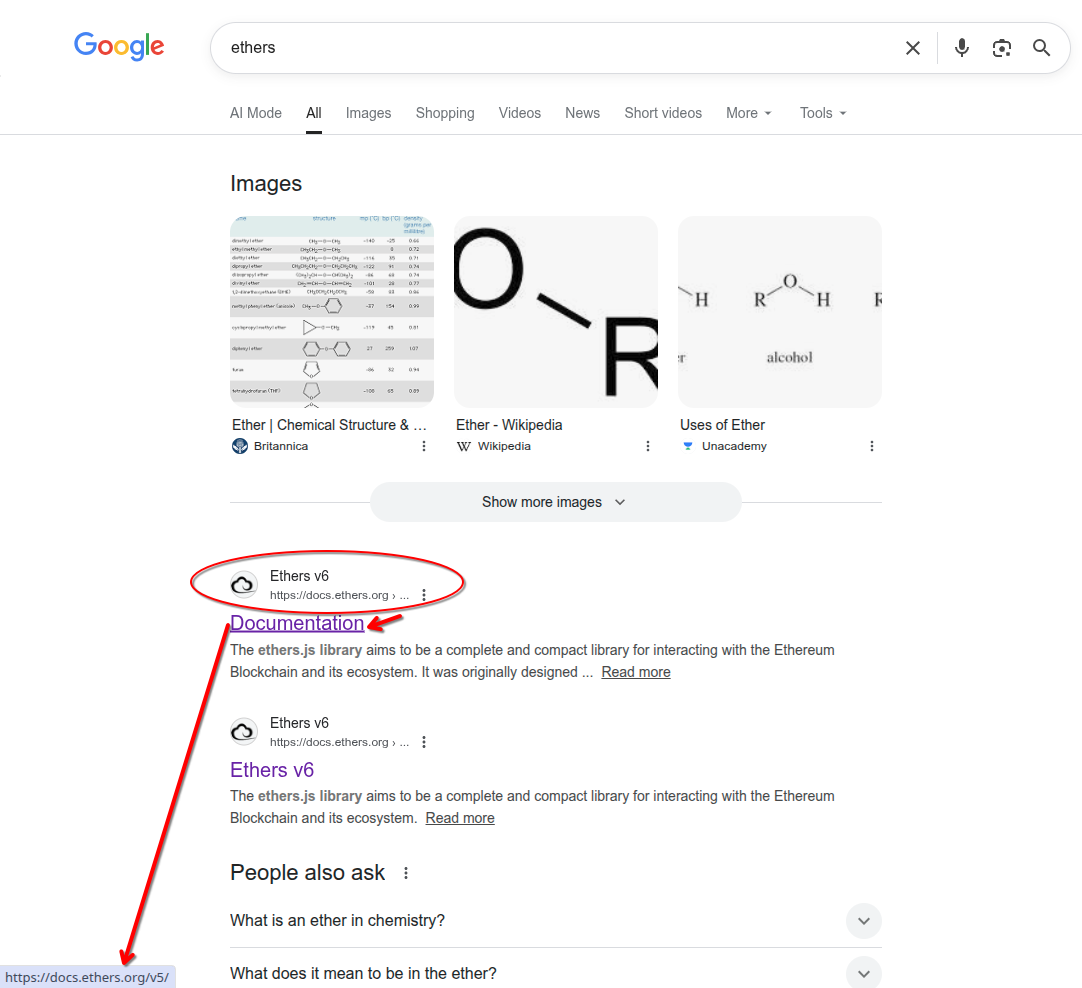
Using ethers.js to interact with EVM chains is pretty much like using cURL. The below function fetches the information for the given transaction hash on Ethereum (if chain is undefined) or on the passed chain.
export async function findTx(txHash: string, chain?: string) {
  try {
    // Decide chain and default to ethereum
    const _chain = chain ?? 'ethereum';
    const _chainId = CHAINS_TO_IDS[_chain];
    const endpoint = `${INFURA_ENDPOINTS[_chain]}${process.env.INFURA_API}`;
    console.log('Finding transaction on the following chain:');
    console.group();
    console.log(`Chain: ${_chain} with ID: ${_chainId}`);
    console.log(`Provider URL: ${endpoint}`);
    console.log('Tx hash:', txHash);
    console.groupEnd();

    const provider = new ethers.providers.JsonRpcProvider(
      endpoint,
      {name: _chain, chainId: _chainId}
    );

    const tx = await provider.getTransactionReceipt(txHash);

    if (!tx) {
      const _tx = await provider.getTransaction(txHash);
      console.log('-- Result of getTransaction --');
      console.group();
      console.log(JSON.stringify(_tx, null, 2));
      console.groupEnd();
    } else {
      const block = await provider.getBlock(tx.blockNumber);
      const utc = new Date(block.timestamp * 1000).toISOString();
      console.log('-- Result of getTransactionReceipt --');
      console.group();
      console.log(JSON.stringify(tx, null, 2));
      console.log('Transaction Timestamp (UTC)', utc);
      console.groupEnd();
    }

    process.exit(0);
  } catch (error) {
    console.error("Error fetching data:", error);
    process.exit(1);
  }
}
The CHAINS_TO_IDS and INFURA_ENDPOINTS are two constants defined elsewhere for convenience. For EVM chains and their ids, visit ChianList. Note that all transactions in the same block have the block's timestamp.
Read data from Solana on command line
Solana is rather different from EVM chains and has its own command line tool. But for reading data from Solana, you can still start with simple curl command.
Let's try to do the same: get the latest block info. At the time of writing this line, the block height is 372240007. Since Infura focuses mainly on EVM-compatible chains, we need yet another provider. Again, for no particular reasons, I choose Alchemy.
curl https://solana-mainnet.g.alchemy.com/v2/<YOUR-API-KEY> \
     --request POST \
     --header 'accept: application/json' \
     --header 'content-type: application/json' \
     --data '{"id":1,"jsonrpc":"2.0","method":"getBlock","params":[372240007, {
         "commitment": "finalized",
         "encoding": "json",
         "transactionDetails": "full",
         "maxSupportedTransactionVersion": 0,
         "rewards": false
       }
   ]}'
The output (folded for better display) is as follows
{
  "jsonrpc": "2.0",
  "result": {
    "blockHeight": 350408185,
    "blockTime": 1760018519,
    "blockhash": "CweRBCmzcQRq9cs93XFiFuGzKrsrM8o8tJ298xmXifiD",
    "parentSlot": 372240006,
    "previousBlockhash": "gBPmktg3nQqMdbc7qxfbWRGsTs24M4pagBwXykFgwHi",
    "transactions": [ ... ]
    .....
    }
}
For detailed info about this method, visit its document page. Also you can try out each method interactively on the very document page for that method. Similarly, Alchemy also lists the compute units for all the methods it supports.
Read data from Solana using Solana Kit
Solana sunsets web3.js in favor of Solana kit. The latter is more modular and lightweight. Solana also shows complete code using kit to get a block's info:
import { createSolanaRpc } from "@solana/kit";

const rpc_url = `https://solana-mainnet.g.alchemy.com/v2/${ALCHEMY_API_KEY}`;
const rpc = createSolanaRpc(rpc_url);

const slot_number = BigInt(372240007);

let block = await rpc
  .getBlock(
    slot_number,
    {
      commitment: "finalized",
      encoding: "json",
      transactionDetails: "full",
      maxSupportedTransactionVersion: 0,
      rewards: false,
    },
  )
  .send();

console.log("block:", block);
Once you know how to read data from chains, you may want to begin sending transactions. To do so, besides an endpoint and a SDK, you will also need a wallet address. For EVM chains, the most popular choice is Metamask; for Solana, it is likely Phantom.
It may be difficult to get some initial funds on the mainnets for these chains. But you can start with the devnets. In addition, this may be a good time to get into the world of DeFi. Like there are a great number of chains already, there are many CEXs and DEXs too. All these may serve as the topic for a future post.